Slash commands
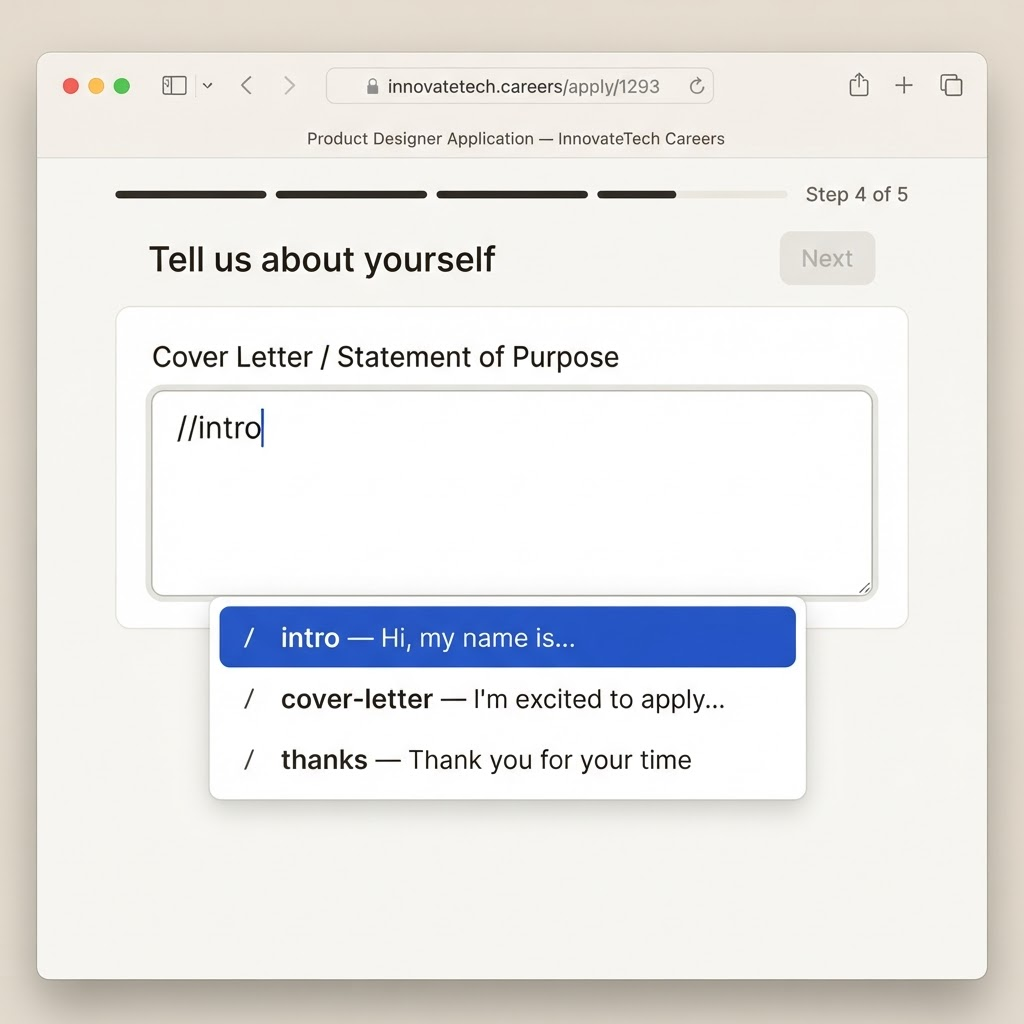
Type // followed by a trigger to instantly insert any saved answer into the field you are typing in.
SlashApply turns your best answers into reusable slash commands. Type // on any site to insert
templates, variables, and your resume — no more copy-pasting the same details.
Works on LinkedIn, Greenhouse, Lever, Workday, and any web form.
A focused toolkit that removes the repetitive parts of every job application.
Type // followed by a trigger to instantly insert any saved answer into the field you are typing in.
Save cover letters, intros, and common responses once. Reuse them across every application.
Store details like your name, portfolio, and salary once with {{variables}} and fill them everywhere.
Keep your resume ready and drop it onto any upload field, or click to fill nearby inputs automatically.
Separate templates, variables, and resumes per job search context and switch between them instantly.
Everything is stored locally with no tracking, no accounts, and no data ever sent to a server.
No accounts, no configuration files. Install it and start applying.
Add SlashApply to Chrome, then create your first profile with your resume, templates, and variables.
Turn the responses you write over and over into templates with a short trigger like //intro or //cover.
On any application, type // to insert an answer, or drag your resume onto the upload field. Done.
SlashApply was built privacy-first. Your resume, templates, and personal details live only on your machine — we have no servers collecting your information.